NewAI colleagues set up for your company, live in four weeks.AI colleagues, live in four weeksHow we deploy →
Context

AI that understands the physical world.

Kintric Context reads your drawings, registers and bills of quantities, and finds where they disagree. It drafts each finding with the page attached, and an engineer approves it before anything leaves.

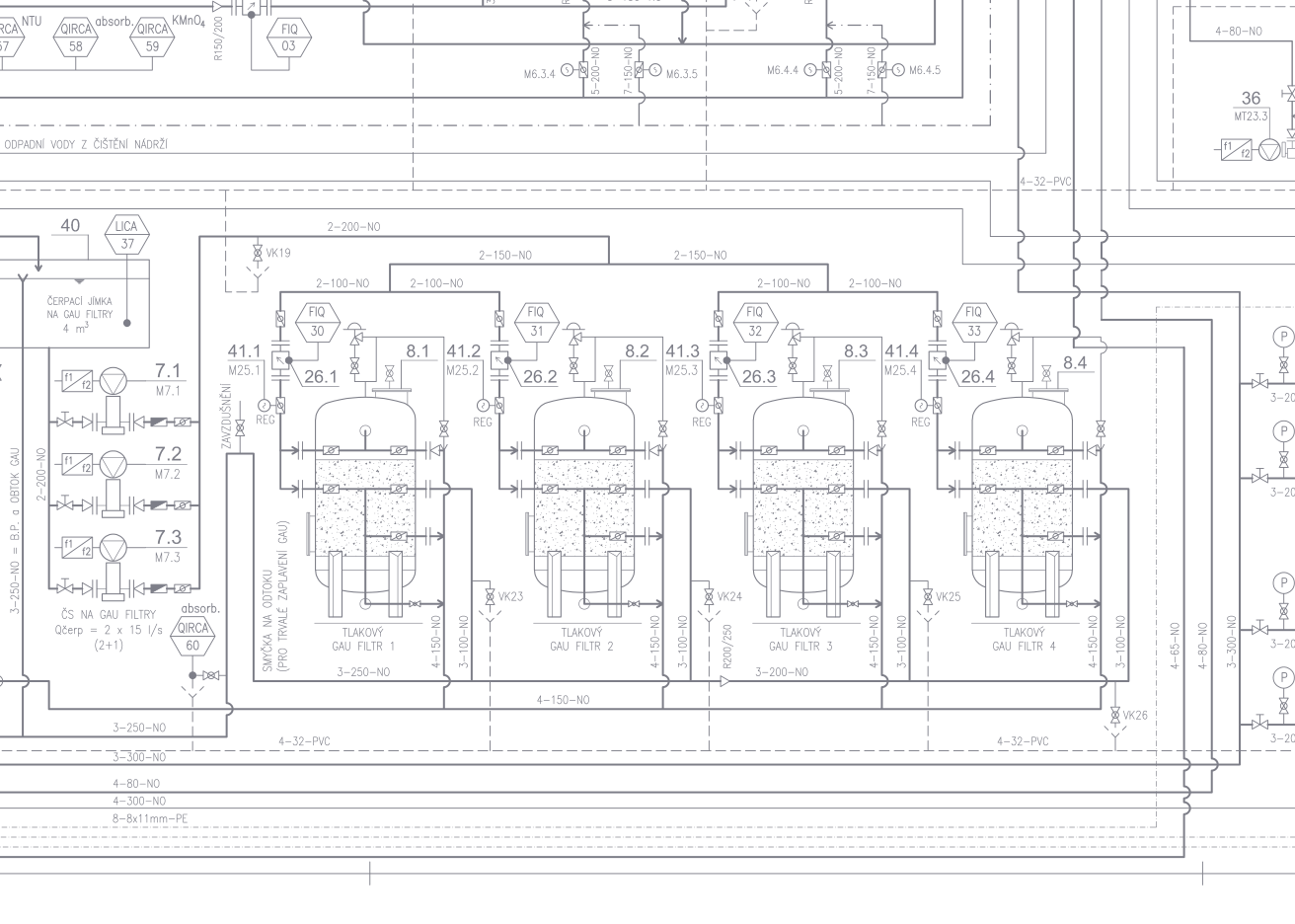
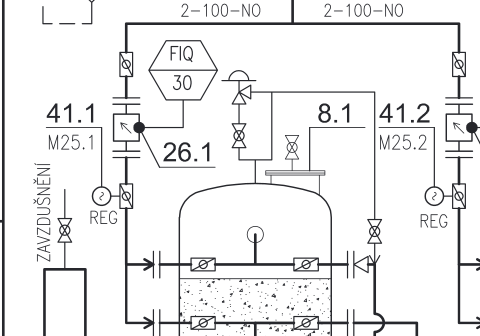
D.2.1.2 Process schematic 402detections 374pipe runs
Context/Water treatment plant/Filter hall 402 items3 sourcesBuilding
2-200-NO2-100-NO2-100-NO
LICA 37Sump level, alarm
SumpFilter feed sump, 4 m³
7.1 – 7.3Feed pumps, 2 + 1 standby
FIQ 31Flow, totalising
41.2Control valve, actuator M25.2
M25.2Actuator
8.2Pressure GAC filter
26.2Flow meter, filter 8.2
41.1Control valve, filter 8.1
8.1Pressure GAC filter
41.3Control valve, filter 8.3
8.3Pressure GAC filter
Water utility/ColleaguesWorking
Water treatment plant · D.2.1.2Tender review
LF

Laura FinchProcess engineer · 09:12

The equipment table on D.2.1.2 came back from the designer. Can you check it against the drawing and the bill, and tell me what doesn’t match?

PDFD.2.1.2 Process schematic1 sheet

Spec and BoQ checkAI colleague09:12

On it. I’ll count the items on the sheet, tie each one to its row in the equipment table and the bill, and flag what disagrees.

  • Opened sheet D.2.1.21 sheet
  • Read the equipment table and the bill2 documents
  • Counted the control valves on the drawing4
  • Checked the table and the bill against the drawing1 mismatch

FindingDraftApproved

Equipment table, rows 41.1 – 41.4: the quantity should read 4.

D.2.1.2, page attachedEquipment table, row 41

ApproveEdit draftApproved by Laura Finch · 09:14
Message Spec and BoQ check…
Water utility/Plant model/Filter hall 402 items61 live tagsLive

Filter hall · built from sheet D.2.1.2AssetsLinesLive values

7.1, 7.22 running FIQ 317.4 l/s 41.264 % open 8.2Δp 0.42 bar

RunningNeeds attentionStandbyFlowLive from the plant historian

  1. 01Read your drawings

    Kintric Context reads every sheet, table and bill. On this P&ID it found 402 items and 374 pipe runs.

  2. 02Build the context

    It ties the drawing, the equipment table and the bill to each item, every fact linked to the page it came from.

  3. 03AI colleagues do the work

    A colleague runs the check end to end. An engineer approves what goes out.

  4. 04A soft digital twin

    Every asset, line and live reading of your plant in one model, built from the documents you already have.

The problem

AI colleagues need context. In heavy industry, it’s locked in data no system reads together.

A plant or a project lives in schematics, equipment tables, bills and data sheets drawn up over many years. Nobody has the hours to check them against each other.

  • Drawings

    P&IDs, schematics and plans, scanned or native.

  • Time series

    Control-system tags, readings and alarms.

  • Documents

    Equipment tables, bills, specs and data sheets.

  • Field records

    Photos, inspections and work orders.

  • Email

    Addenda, questions, quotes and supplier threads.

How it works

From data, to context, to action.

Kintric Context does two things. It builds the context from your documents and data, then sets up the AI colleagues that work on it.

The context layer

Your documents, connected.

Kintric Context reads your drawings, equipment tables, bills and data sheets, and links every tag, line and item across them into one model of the plant. Every fact keeps the page it came from.

PDF and CAD drawings, P&IDs and DEXPI files, tables and spreadsheets, without redrawing anything.

Each tag on the drawing is tied to its row in the equipment table and its item in the bill.

Open any fact and the drawing shows where it was read.

AI colleagues

Set up for your plant.

On that context, AI colleagues take on the checks your engineers do every day. Each one follows your rules, works with the documents you already have, and sends its work to a named engineer to approve.

Each colleague does one job the way your team does it.

Drawings, tables, bills, reports and data sheets, as you receive them.

Nothing leaves until an engineer releases it. The audit log keeps who and when.

An honest comparison

To vibe-code or to buy?

Vibe coding is the quickest way to a prototype, on the same frontier models we use. We are the way to something you can rely on: stable, secure and checked, every week.

What you get

One sheet of a water treatment plant, read both ways.

Vibe-coded in-house

Kintric Context

Vibe-coded in-houseKintric Context
Speed to a first version

Days. This is where vibe coding wins.

Four weeks to the first AI colleagues at work, with our engineers in your team.

Reliability

Only as good as the last time someone checked it. It reads the one kind of drawing it was built for.

Every number on its page, checked against your tables and bills. Anything unsure goes to an engineer.

Stability

Shifts when the model changes, and stops when its builder moves on.

Checked against a test set of real tenders and P&IDs, and kept working by our engineers.

Security

Wherever your AI account processes your drawings. You arrange that with IT.

Servers in the EU, one workspace per company, never used for training.

Sign-off

Whoever ran it. No approval step or log unless you build one.

A named engineer approves each result, and the log keeps who and when.

Finished work

A list or a graph that someone still turns into a take-off or a report.

The take-off, the checked bill or the change package, in your format.

Vibe-code the prototype. Bring us in for the version your engineers rely on every week.

See what it costs

How we deploy

Live in four weeks, with our engineers inside your team.

We don’t install software and walk away. For the first month our engineers work with your team, connect your drawings and documents, and set up the AI colleagues around how your engineers already work.

4 weeks

from kickoff to your first AI colleagues at work.

One investment

one fixed price covers the whole pilot, with nothing added later.

15

AI colleagues to choose from, each with one job.

  1. Week 1

    Pick the work

    We sit with your team and find the checks that cost the most.

  2. Weeks 2–3

    Build

    Our engineers connect your drawings and set up the AI colleagues on them.

  3. Week 4

    Go live

    The AI colleagues start work. Your engineers approve what they send.

  4. Month 2

    Measure

    We stay through the second month, tune the work and measure the savings.

See what it costs

For private equity and industrial groups

We roll it out across the industrial companies you own.

For private equity firms and industrial groups that own several plants, utilities or contractors. We go into each company, connect its drawings and documents, and put AI colleagues on the checks that cost the most hours. What works at one company is set up at the next.

Each company gets its own workspace, documents and approvers, and its first AI colleagues at work within four weeks.

A colleague that pays off at one company is set up at the next, so each new company starts faster.

What is live at each company, what is being set up, and the hours it saves.

How we deploy

Questions, answered.

AI colleagues set up for your company, on a context layer that connects your drawings, equipment tables, bills, documents and email. Each one does a defined job, and a named engineer approves its work before anything leaves.

Engineering drawings such as P&IDs, schematics and plans, including DEXPI files; equipment tables, bills of quantities, specs and data sheets; control-system tags and readings; photos, inspections and work orders; and email. Scans, PDFs and CAD exports all work.

No. Reading drawings and documents as they are is the work Kintric Context does. Our engineers start with what you have.

One investment covers the whole pilot, with nothing added later. Our engineers work inside your team for the first month, and your first AI colleagues are at work within four weeks.

Oil and gas, chemicals, energy, manufacturing and construction, including companies owned by private equity firms and industrial groups.

Each company works in its own workspace on servers in the EU, and the colleagues use a frontier model through its provider’s API. Every approval is logged with who and when, and your documents are never used to train models.

Kintric Context

Start with the check that costs your engineers the most.

Tell us where your engineers lose the most hours. Four weeks later, an AI colleague set up for your company is doing that work.

Add your name.

Add an email we can reply to.

Add your company.

When

Used only to reply to this request.

Request sent

We will reply soon.